How to stop your alarm beeping

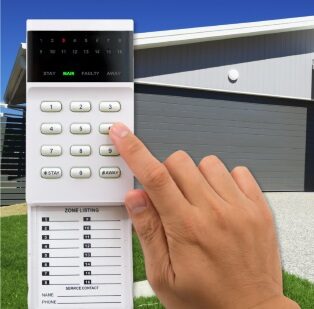
If your alarm panel is beeping, it is signalling a fault condition. Press the “AWAY” key on the panel to acknowledge the fault and stop the beeping. On our more advanced system, press “OK” when “System Fault” appears on the screen.
Why your alarm panel beeps
If you have a fault condition come up within your system, you will notice a loud beep emitting from the panel every two minutes or so, until someone acknowledges the fault. This issue can be avoided if you get maintenance on your system every twelve months. Find out more about the importance on maintaining your alarm system here.
How to silence the beeping
You will see a flashing caution symbol on the panel to the right, and a flashing yellow light on the panel to the left.
- Press the “AWAY” key on the panel and it will acknowledge the fault and stop beeping.
- With our more advanced system, it will come up on the screen with “System Fault”, and all you need to do is press “OK”.
- Once you have silenced that system, make sure to contact us to conduct maintenance and rectify the fault.
What a fault beep is telling you
Alarm panels constantly check their own health, watching things like mains power, the backup battery, communication links and the state of each zone. When one of those readings falls outside normal, the panel raises a fault condition and beeps at intervals to draw your attention to it. Silencing the panel only acknowledges the alert; it does not repair whatever triggered the fault, which stays flagged until the cause is checked and cleared. The video above walks through acknowledging a fault on the panel so the beeping stops. Access Alarms has installed and serviced alarm systems across Brisbane and South East Queensland since 2006, working from our base in Eagle Farm, and can identify and fix the underlying fault.