Safedials & Monitoring Your Alarm System

A SafeDial Wireless Communicator connects your alarm system to a SIM-based communication path, so you can arm, disarm and receive alarm notifications from your phone, and optionally link the system to a monitoring centre for back-to-base monitoring.
The SafeDial started as a backup for your telephone lines, or an alternative if a site did not have a phone line. We now use it as a primary communication path. Having a SafeDial connected to your alarm system lets you control the system from your phone, arming and disarming it through an app that also sends notifications of any alarm events. The SafeDial can be connected to a monitoring centre, allowing for back-to-base monitoring. It will connect to most alarm systems, but you can contact us if you would like to confirm it is compatible with your system.
Access Alarms has installed and serviced alarm systems across Brisbane and South East Queensland since 2006, from our base in Eagle Farm.
How the SafeDial arms and disarms your system
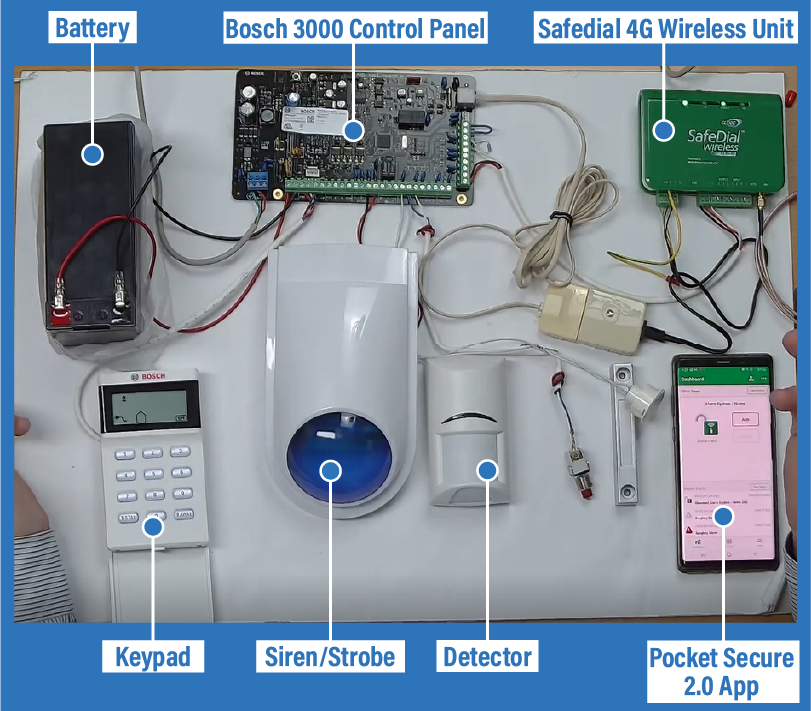
The diagram shows a very basic Bosch 3000 alarm system connected to a SafeDial unit. This connects the alarm system to the Pocket Secure 2.0 app, which allows remote access to the system. Whether you are close to the alarm system makes no difference; the app works the same either way. To arm the system from the app, press and hold the “Arm” button. That sends the request over to the SafeDial and arms up the alarm system. The light flashes red on the SafeDial, and that is the alarm system communicating with it to say that it is armed. This arming process can take a couple of minutes, as it will still allow 45 to 60 seconds to leave the house. The red light on the SafeDial will not show until that entire process is completed.
If the alarm is now triggered by one of your detectors, the siren will start sounding and the blue strobe light will flash. After a few seconds, a push notification will appear on the app to advise you that your alarm system has been triggered. Once you see that notification, you can go straight into the app and press the “Disarm” button, and that will disarm the system.
Why we recommend a SafeDial
Your alarm system is connected to a backup battery so that it continues to run even if you have lost power. Phone lines, and even NBN connections, will generally rely on a direct connection to power and will stop working when power is lost. The SafeDial unit communicates via a SIM card and is powered by your alarm system. As long as your alarm system is running, you will still be able to communicate with it. As with the SIM card in your phone, you are still susceptible to losing connection to the cell phone tower, but this is rarely an issue. Relying on a SIM card connection is considerably more reliable than the telephone line method that was used previously.
What a SafeDial installation costs
We will install a SafeDial unit for a fixed cost of $295 for all major cities. This installation includes:
- Supply of Safedial Unit
- Connection to an existing alarm system
- Programming
- Set up of phone app
- Connection to monitoring centre (if having back-to-base monitoring)
Monitoring options and quarterly costs
- Self-monitoring ($55 per quarter): The first level of monitoring covers the connection between your alarm system and the phone app. It enables you to arm and disarm your system via the app and receive push notifications of any alarm events.
- Back-to-base monitoring ($148.50 per quarter): The next level of monitoring gives you the same abilities as self-monitoring, but also connects your system to a monitoring centre. In an alarm event, depending on your setup, they can call designated emergency contacts, organise a patrol to attend, or even call the police.