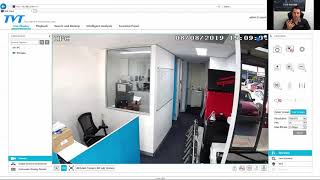
TVT Fisheye Camera Demo

The TVT 6MP Fisheye is a single-unit camera that provides a 360° view with many options to view every degree. It is easy to set up and very cost-effective.
What is inside the TVT 6MP Fisheye camera?
Built in to the unit is an SD port, a microphone and infrared LEDs (meaning it will produce its own infrared light at night time). The unit comes straight out the box ready to set up with multiple different connections.
Ports and connections on the unit
- Network port: Allows you to connect the camera straight into your network/ethernet
- 4x alarm inputs: These can connect to triggers that notify you of an occurrence, and can function with an SD card in the unit
- RS485 connection: Allows you to use the camera with a PTZ controller
- Analogue output: Can connect the camera with a TV
- Microphone input: The camera has an inbuilt microphone, but you can also connect an external one
- Audio output: You can speak through the app on your phone and have the audio come out of any attached speakers
Viewing the camera on your PC
When you log in to your TVT camera system on your PC, you will be able to view your camera in multiple types of displays. If you have not set this up yet, you can arrange a security camera installation with us. You will start off with a fisheye view of what the unit is seeing. In the toolbar on the right, you will see multiple display options. You can change the view in any of the frames in each display mode by simply clicking and slowly dragging within the frame. The different display modes are:
- Fisheye view: 360° view as a singular round image
- Fisheye and 4 frames: Fisheye appears on the left, and 4 frames showing different angles on the right
- 180° view: Two long frames, each showing 180°
- Fisheye and 8 frames: Fisheye view in the center, and 8 frames showing different angles
- Fisheye and 3 frames: Fisheye view in the upper-left corner, and 3 frames showing different angles
One of the great things about this unit is that, no matter what display mode you have selected, it will only take up one camera slot in your system. Many competitor units will take up multiple slots. This is because the camera only needs the fisheye image, and can create any of the other views using this image. That means you can change display modes for the footage it records in Playback mode as well. Because the unit has a built in microphone, you can also listen to the audio it records, and this will work in both Playback and Live Display modes.
Viewing the camera on your phone
When you bring up the camera on your phone, you will be able to use similar viewing methods to those on a computer, and it is very simple to use. When you start up with the fisheye display, you can simply double tap your screen to go straight into the image. Similar to your computer, you can press and drag to move your view around the room. There are similar display modes on your phone as on the computer, and you can choose between them on the menu to the right of your phone screen. One of the benefits of viewing the unit from your phone is the ability to do so in a VR mode. In this mode you can turn and rotate your phone around you to view different angles of the recording.
Access Alarms is based in Eagle Farm, Brisbane, and has installed and serviced security cameras across Brisbane and South East Queensland since 2006.